Key takeaways from the article:
- Unmoderated testing lets you quickly verify the functionality or visual design of a website with a relatively large sample of respondents.
- Be careful with interpretation. Your questions need to be well-prepared so you're actually asking what you want to know. Unlike moderated testing, you have no opportunity to ask follow-up questions or adjust them during the session.
- Always choose the right method based on the testing goal and what you want to verify.
What is unmoderated testing
Unmoderated testing means there is no moderator present to guide the respondent through the session. This sets it apart from moderated testing, which we've already covered. It is essentially any testing that the user completes on their own, based on instructions or a scenario you prepare in advance.
„The goal might be, for example, to process as many people as possible in the shortest time — while still being able to effectively verify whether you're heading in the right direction with the project."
Unmoderated testing can be conducted in various ways — with randomly selected respondents or with a carefully chosen target audience. In person or remotely. It depends on the testing goal, and you should always consider efficiency.
Advantages of unmoderated testing
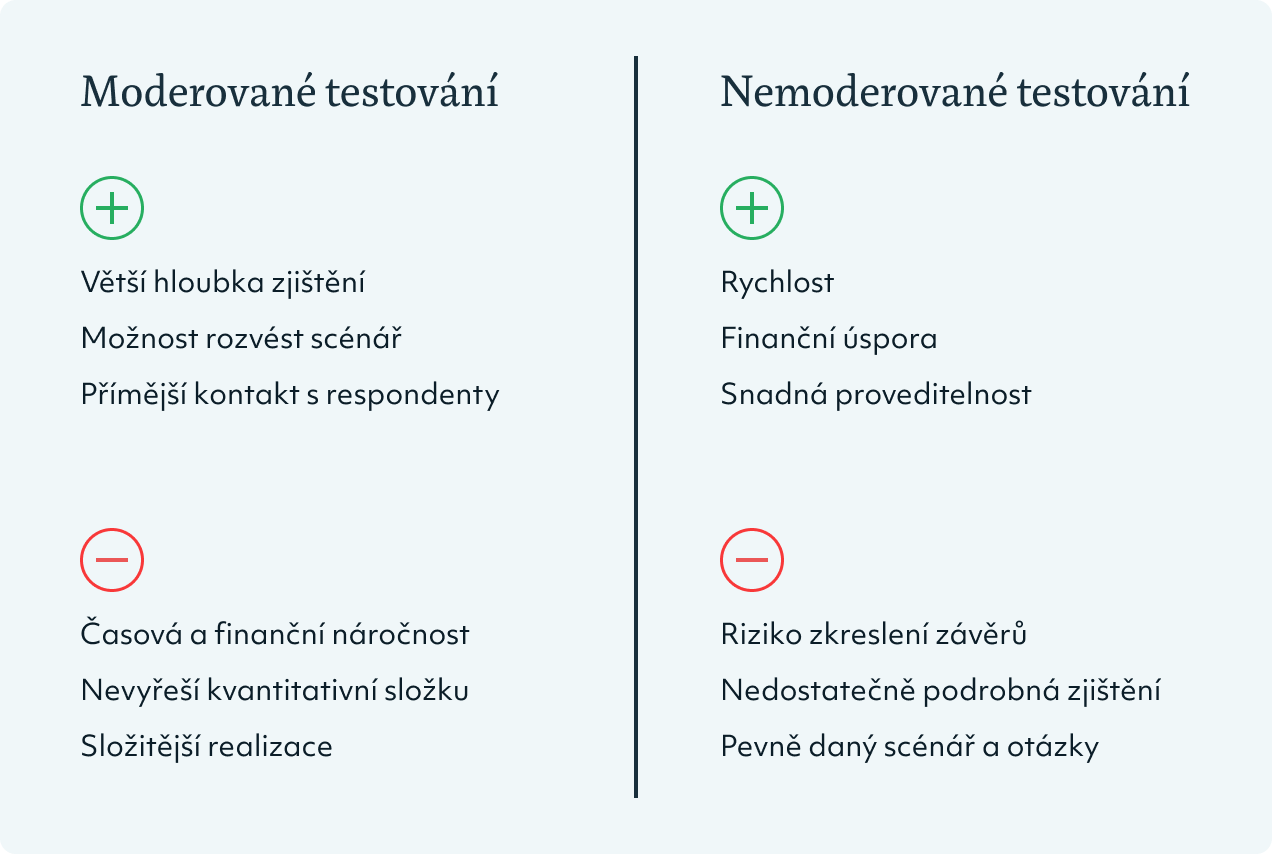
There are many methods that can be conducted without moderation. They vary in scope and can take anywhere from a few seconds to an hour, but their main advantages remain:
- speed — data can be collected within a few hours,
- fast turnaround and cost savings — partly because you don't pay for a moderator,
- ease of execution — you're not tied to a moderator's schedule and can run testing at any time.
The limitation of unmoderated testing is the potential for bias arising from inaccuracies on the part of:
- the respondent, who may misunderstand the task with no one to correct them,
- or the evaluator, who won't receive supplementary comments and explanations from the respondent — so they can see how the respondent reacts, but not why.
Research methods often conducted without moderation
Five-second tests
You show a respondent a website homepage, landing page, product detail, or specific feature for 5 seconds. The respondent then answers a prepared set of questions. You can use this to find out whether they understood what the company does, what the product is, or whether they can buy it directly on the page.
Five-second tests give you a quick read of a user's first impressions. You can verify:
- whether they can navigate the page content,
- whether they understand what it says and know what to do,
- how the page makes them feel,
- and whether they perceive information exactly as you intend.
„Five-second tests are useful for testing individual parts or features of a website. You quickly get confirmation that you're heading in the right direction and it helps you iron out the biggest flaws. However, you can't base major decisions on it, as it isn't very precise."
Preference tests
The respondent compares two or more variants and must choose one — for example, the one they find clearer, more playful, or the one they think contains more important information.
Preference tests are well-suited for emotional testing. However, they won't verify the usability of a solution — because the respondent is answering based on feeling, such as thinking one variant looks clearer. To find out which variant they actually navigate better, you'll need usability testing.
Product Reaction Cards
Used to measure emotions and associations — whether related to text, visuals, or the overall feel of a website. The respondent evaluates a given output using <b>118 cards with adjectives</b><divider>We only offer respondents a selected set of cards. We typically use 60 cards, 20 from each category. (positive, negative, and neutral). They select the cards that best capture their impressions.
Product Reaction Cards are used for emotional testing and to verify whether a proposed design fits the brand or evokes the desired associations among visitors.
„It's a quick method for testing how respondents perceive a given website. Complications can arise during evaluation, where you can't verify that you and the respondent assign the same meaning to individual adjectives."
Card Sorting
Respondents receive cards representing individual pages, sub-pages, categories, or products of an e-shop, which they group and arrange into a structure that makes sense to them.
The method has two types:
- open, where respondents receive cards and freely define the structure, hierarchy, and layout of information (for example, website pages or e-shop product categories),
- closed, where respondents sort cards into pre-defined categories (useful for large information structures — it gives respondents something to work with and makes the task easier).
Card Sorting is used for creating or testing a website's information architecture, or for categorizing and filtering products. It helps you verify whether your users think about page structure the same way you do.
„You gain insight into your users' perspective and how they think about the website structure. Especially with more complex solutions, respondents rarely agree on exactly the same arrangement. So treat the method as guidance, not a definitive answer."
Tree testing
Unlike Card Sorting, the respondent doesn't create the website structure — instead, they try to find a specific page or product within it. In practice, both methods are often combined.
Tree testing is used for testing website navigation or for quickly verifying that you've correctly placed products under the categories where users would naturally look for them.
First-click test
The respondent views a page (or a design mockup) and is asked to perform a specific action or find particular information. The test is typically evaluated using heatmaps showing where respondents looked or clicked.
This method is used to test the recognition of key actions on a page and whether they have the right visual priority. For example, whether a user responds to the instruction "add to cart" by clicking the correct button.
„In an unmoderated first-click test, you might discover that a respondent can't find a button or is clicking in the wrong place. Without follow-up questions, however, you won't know whether the problem lies in the button's placement, appearance, label, or whether some other element is distracting the visitor's attention."
Question tests
Respondents answer questions about a given page or feature. The test isn't time-limited (unlike the five-second test) — the goal isn't speed but giving respondents time to think through their answers.
Question tests are used when testing specific elements, features, or content comprehension. For example, you show respondents tabs, categories, or buttons on a website and find out what they expect to happen when they click on them.
If you want to verify whether a visitor can find specific information or a button, or whether they can complete a specific action, run a first-click test. If you want to ask follow-up questions about specific elements on the page, use question tests.
A comparison with preference tests is also useful here. Because preference tests aren't suitable for usability testing, question tests and first-click tests are used instead:
For example, suppose you have 3 graphic button variants and want to know which will attract the most attention:
- in a preference test, you show respondents the variants and ask which they find most prominent — you'll learn what they think, but not which variant will actually perform better,
- a first-click test is more appropriate — you run 3 tests (one per variant) and compare them using various metrics (how long it took the respondent to complete the test, whether they successfully completed it and used the tested button, etc.)
Or suppose you have 3 different labels for an "add to cart" button and want to find out which is most effective (i.e., which people understand correctly most often):
- in a preference test, you show the variants and ask which label seems most appropriate,
- in a question test, you run 3 separate tests and in each one ask the respondent what they expect to happen after clicking the button. You then compare how well the answers match what actually happens, and compare the variants against each other.
You can also use A/B testing to test variants. However, it's a complex method and not always appropriate due to the traffic requirements.
Unmoderated or moderated UX testing?
Unmoderated user testing is best suited for testing individual design decisions. It allows you to test a solution with the largest possible sample of respondents, quickly and relatively affordably.
For online testing, you send respondents a link where they complete the test. This way you can process dozens of users at once, without needing to invite each one individually and guide them through the session. That's the advantage of unmoderated tests.
If you want to quickly verify a single website element or ask respondents one question, unmoderated testing is sufficient. As soon as you need a deeper understanding of why a respondent made a particular decision, conduct the method with moderation or supplement it with in-depth interviews.
„With unmoderated testing, you won't go as deep, because you lack immediate feedback. You can't react to situations as they arise or ask follow-up questions. That's not a flaw of the method, though — simply keep in mind that unmoderated testing is better suited for the quantitative dimension, and that's where its strength lies."
Always consider the testing goal and decide accordingly which method will be most valuable for you.
Several tools can help with the actual testing, such as UsabilityHub or Maze. Alternatively, you can entrust the testing to an agency, which will select the right method, prepare the test scenario, provide recommendations for recruiting suitable respondents (for example, from the client's customer base), and run, evaluate, and interpret the results of the testing.